Running Untrusted Code in Firecracker microVMs Inside a Docker Container
Running untrusted workloads in standard Docker containers can be risky. In this project, we spin up a dedicated Firecracker microVM directly inside a container for every single user request. Here is how we built our setup without full root privileges.
Background: Why a container was not enough
We built a service that visits arbitrary URLs and captures a screenshot of the rendered HTML of the given web page using the Playwright testing framework. The URLs are submitted by users and are assumed to be hostile. Web pages may contain Drive-by Downloads or might be injected with malicious scripts. In order to take a screenshot, we have to fetch this remote content and actually execute it on our infrastructure, potentially endangering our host and other services that run on it.
The screenshot service is one component of a larger project. Each of these component ships as a Docker container and is orchestrated with Docker Compose. Docker gives us container-level isolation, but all containers on the same host share a single kernel. An attacker who reaches code execution inside the browser and manages to break out of the Docker container is on the same kernel as every other service we run.
For this service, we wanted stronger isolation without giving up the container-based deployment model the rest of the platform already uses. We settled on Firecracker microVMs running inside a dedicated Docker container (Fig. 1).
TL;DR
- Every screenshot request gets a fresh Firecracker microVM that is started on demand and destroyed right after the scan. Playwright only interacts with the guest kernel.
- The microVM runs inside the Docker container, so the service still deploys as one Docker Compose service alongside the rest of the platform.
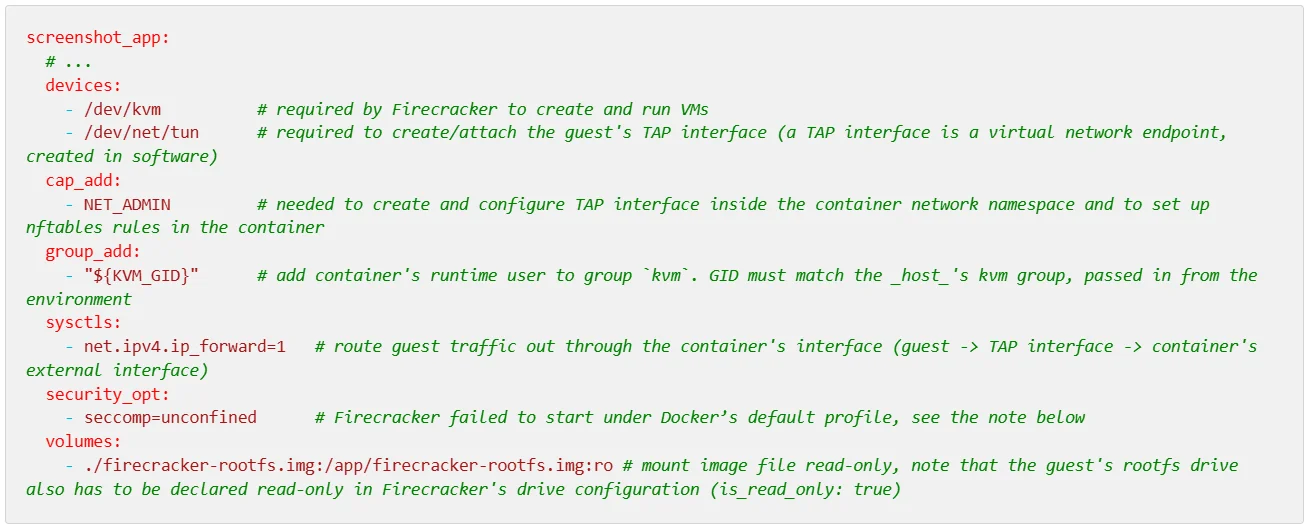
- The container is not run with [--privileged]. Additional privileges are required by Firecracker. The container gets [/dev/kvm] and [/dev/net/tun] as device mappings and the [CAP_NET_ADMIN] capability. Its process gets an additional group ID that matches the host's [kvm] group.
- Inside the container the work is split across two processes: a small privileged networking helper and the scanning service itself. The scanning service, which manages microVMs and user input, runs as an unprivileged user and asks the helper for the network config operations it cannot perform itself. Firecracker never runs as root.
- The guest root filesystem is mounted read-only, and the Playwright code inside the guest interacting with hostile websites runs as an unprivileged user.
- The guest sends scan results back to the host via a virtio-vsock device. We first piped them through Firecracker's serial console, which turned out to be detrimental to performance.
Prerequisites
See the Firecracker getting-started guide for the full list of prerequisites. Using the vsock device is Firecracker's preferred way of communication between host and guest, so also check its prerequisites. We tested our setup on Ubuntu 22.04.5 LTS (KVM available, nested virtualization enabled because our test host was itself a VM), Firecracker v1.15.1, and Playwright for Python 1.59.
Why Firecracker
Firecracker is an open-source virtualization technology built by AWS, optimized for running short-lived, serverless, single-purpose multi-tenant workloads with strong isolation. It has a minimalist design that excludes unnecessary devices and functionality, reducing its attack surface. Firecracker enables deploying workloads in lightweight virtual machines (microVMs) that can be booted in as little as 125 ms.
Firecracker was the perfect choice for our use case: it offers the strong isolation of VMs without the slow start-up penalty.
One microVM per scan
We do not reuse microVMs across screenshot scans. A new VM is created for every request and destroyed afterwards. Reasons for this design decision include:
- No shared kernel with the host. The untrusted browser makes syscalls against the guest kernel. The host kernel space is only reachable through KVM and Firecracker's device emulation (see Firecracker design description for further details).
- No persistence. The root filesystem is read-only. Playwright needs a writable [/tmp] folder, so a tmpfs is mounted in guest RAM at boot.
- No cross-scan contamination. There is no state shared across scans (as all VMs share one image file, having a read-only rootfs is a necessity)
Service Architecture
Our service mainly consists of
- the FastAPI application that handles user requests and the creation of new microVMs
- the Playwright code that takes the screenshot of the given URL, running inside the microVM
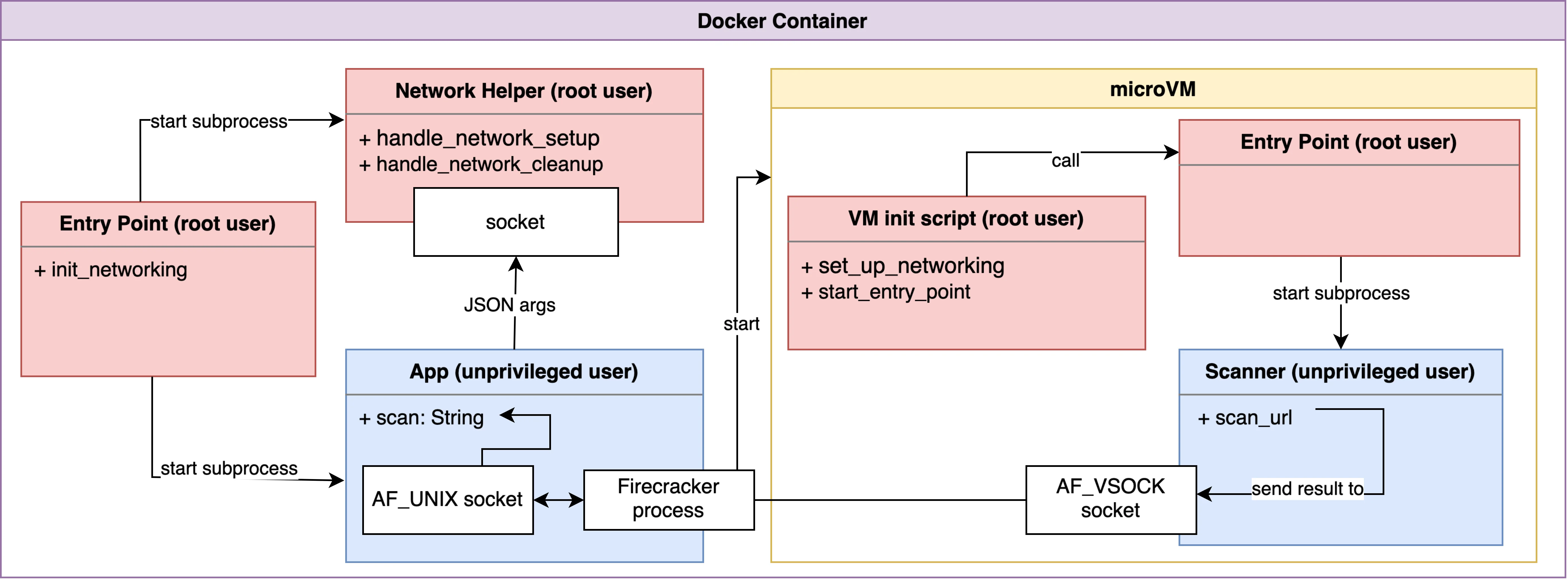
Both run as unprivileged users. Setting up the microVM's network on the container side requires [CAP_NET_ADMIN], so this step is split out into a small helper process running as root. Inside the guest, the init script also runs as root to configure networking before handing over to the unprivileged Playwright process (Fig. 2, see Privilege separation).
Making Firecracker work inside a Docker container
In order to run Firecracker inside a Docker container, the following changes to our Docker Compose service definition are worth noting (Fig. 3):
[seccomp=unconfined]. NOTE: Disabling Docker's default seccomp profile is far from ideal, as the container's system calls are no longer filtered. It is worth noting that Firecracker installs its own seccomp filters. Firecracker processes are thus not unconfined, but other processes in the container are. It might be possible to define a custom seccomp profile that only allows system calls needed by Firecracker and blocks everything else, but we haven't verified this yet.
Privilege separation
Privilege separation inside the Docker container
Setting up networking for new VMs needs [CAP_NET_ADMIN], starting Firecracker and handling screenshot scans don't. For this reason, the container's entry point starts two processes:
- A network helper, running as root, that binds a Unix domain socket, accepts exactly two commands — [network_setup] and [network_cleanup] and performs the corresponding privileged operation.
- The scanning service, running as an unprivileged user. It handles the scan requests and manages Firecracker processes. When starting new microVMs, it sends a [network_setup] command over a socket to the network helper, passing a server-generated TAP name as an argument.
Note that the network helper listening on a socket is a privilege escalation path by design and the TAP name is given as an argument (server-generated in our case). To prevent command injection, arguments to [subprocess] calls are passed as lists (with [shell=False]). Also, arguments to the helper's operations are validated against a strict allowlist.
The network helper could possibly be run as a dedicated unprivileged user holding just the capabilities the script needs.
Privilege separation inside the microVM
It is possible to configure an init binary in Firecracker's boot arguments. In our custom init script, the microVM's network connectivity is established, which requires root privileges. We wanted the script handling Playwright and taking screenshots to run as an unprivileged user, as this is the component that actually interacts with potentially hostile websites. During this stage of the boot process of the VM, [su] doesn't seem to work as expected. For this reason, the init script starts a helper script that runs the scanning script as a separate subprocess with dropped privileges.
Guest-to-host communication: from serial console to vsock
The guest has to hand back the screenshot results to the host. In our first naive implementation, we wrote the base64-encoded screenshot to stdout, and the host parsed it out of Firecracker's serial console output. This approach worked but proved to be a major performance bottleneck, especially for large scan results (end-to-end scan time of up to ~30 seconds). Firecracker's own documentation treats the serial console as a debugging tool and recommends disabling it in production.
We then switched to Firecracker's virtio-vsock device, which is the intended mechanism for host/guest communication, cutting scan times to ~6 seconds, which is roughly twice the amount of time a scan takes to run directly on our test host. Data coming over vsock is of course untrusted and validating this data is essential.
Further security considerations
To further mitigate the risk to the host and the rest of the platform, the following points are also important:
- Resource limits. Each microVM's vCPU count and memory are fixed by updating the VM's machine configuration (using Firecracker's [PUT /machine-config] API call). Network and disk I/O can be capped with Firecracker's rate limiters. On top of that, the Docker container itself is constrained (see Docker resource constraints) to avoid exhausting host resources.
- Network egress. Guest traffic is forwarded through the container, which means that the guest can reach everything the container can reach. The guest thus needs to be prevented from reaching the host network or other containers by dropping the corresponding traffic.
- Updates. Playwright, the guest kernel and Firecracker need to be kept up to date. Updating means rebuilding the rootfs and swapping the image file.
Conclusion
By nesting microVMs inside a Docker container, we are able to run untrusted code in an isolated and secure manner without having to abandon our container-based deployment model. Our dedicated container needs additional privileges in order to be able to run Firecracker processes, which took several iterations to get right and could still be improved to adhere to the principle of least privilege. We use the privilege-separation pattern to be able to run Firecracker as an unprivileged user. The described setup can serve as a starting point. For production use, please also check Firecracker's production setup recommendations and consider using Jailer for stronger isolation between Firecracker processes, which is not strictly necessary for our use case and would have required starting Firecracker as root.
Resources
- Firecracker repository and documentation
- AWS Firecracker Blog Entry
- Getting started
- Virtio-vsock device
- Seccomp in Firecracker
- Production host setup recommendations
- Playwright Python API
Disclosure: Gemini 3.8 was used to improve readability.